Introduction
MicroStation is a 3D design tool.
It lets you model objects in a 3D space, and also works in 2D.
Often, we want to model an object and then rotate it.
In this article, we discuss rotation in 3D using a VBA Matrix3d.
If you're interested in 2D rotation, go our article
about 2D rotation.
Rotation in 3D
Rotation in 3D is more complex than in 2D because the order of rotation matters.
If you rotate something by N° about the X axis then M° about the Y axis,
you get a different result to rotation by M° about the X axis then N° about the Y axis
or by M° about the Y axis then N° about the X axis.

The VBA
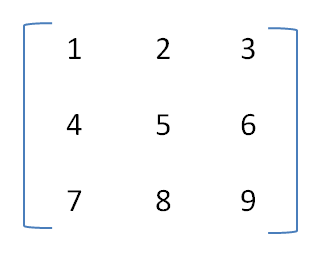
rotation matrix (Matrix3d)
is a set of 3x3 Double numbers.
It embodies rotation in all three axes.
By multiplying a point by a rotation matrix you rotate it around an axis.
Depending how you calculate the matrix, that may be one of the X, Y or Z axes.
Constructing a 3D Matrix
You can construct a Matrix3d using VBA Matrix3dFromAxisAndRotationAngle(),
where the axis is the X, Y or Z axis.
There are many other ways to calculate a Matrix3d:
see the examples in the 2D rotation page.
Rotation About an Axis
More generally, you can construct a Matrix3d using VBA Matrix3dFromVectorAndRotationAngle(axis, radians).
First, calculate the vector (a VBA Point3d) to use as the axis in that rotation.
For example, that might be obtained from the end-points of a LineElement …
Const angle1                            As Double = 30 ' degrees
Dim r1                                  As Double
r1 = Radians(angle1)
Dim oLine                               As LineElement
'  Get line from somewhere
'Set oLine = ...
Dim axis                                As Point3d
axis = Point3dSubtract(oLine.StartPoint - oLine.EndPoint)
Dim rotation3D                          As Matrix3d
rotation3D = Matrix3dFromVectorAndRotationAngle(axis, r1)
The variable rotation3D contains a matrix that will rotate a point about the axis created from the line element.
View Rotation
It's common, while placing an element in a DGN model, to want to rotate the element to align it with the view that contains the cursor. That operation inverts the view rotation to apply to the element.
Dim oView                               As View
Set oView = ActiveDesignFile.Views(1)
Dim viewRotation                        As Matrix3d
viewRotation = oView.rotation
Dim contraRotation                      As Matrix3d
contraRotation = Matrix3dInverse(viewRotation)
'   Get a text element from somewhere
Dim oText					            As TextElement
Set oText = ...
oText.Rotation = contraRotation
The element (a text element in this example) is rotate by the inverse of the view rotation. That's to say, it's counter-rotated by the view rotation. The result is that the element appears horizontal in the view.
Euler Angles: Extracting the Angles of Rotation from a Matrix3d
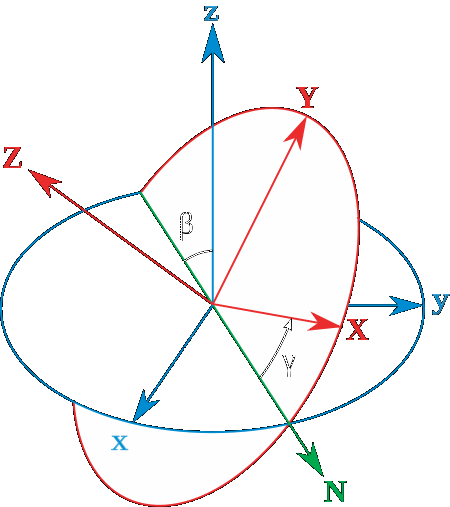
A If you have obtained a 3D rotation from an element you
have a Matrix3d.
You can extract the angle of rotation about the X, Y and Z axes (also known as the
Euler angles)
like this …
Dim oCell As CellElement
 ... get oCell from somewhere
Dim rotationX As Double
Dim rotationY As Double
Dim rotationZ As Double
Dim scaleFactor As Double
If (Matrix3dIsXRotationYRotationZRotationScale ( _
      oCell.Rotation, _
      rotationX, _
      rotationY, _
      rotationZ, _
      scaleFactor)) Then
  Debug.Print "Cell rotation XYZ " & _
    CStr (Degrees (rotationX)) & _
    CStr (Degrees (rotationY)) & _
    CStr (Degrees (rotationZ))
End If
The Identity Matrix
Read more about the identity matrix.
Questions
Post questions about MicroStation programming to the MicroStation Programming Forum.


