Q Is there any way to capture MicroStation® CONNECT messages like error, prompt, command, status in VBA, the DgnPlatformNet API or the MicroStationAPI?
A MicroStation's Message Center provides a resizable panel where informational, status and error messages are posted by MicroStation's built-in commands. You can communicate in various way with your program's users. You can also send debug messages that they can copy and send to you to aid with diagnostics. This article shows you how. Most of the examples are written using VBA: there are brief summaries of MicroStationAPI and DgnPlatformNet usage.
The ShowMessage subroutine has one required argument: a short message. Optionally, you
may provide an additional longer message, a message priority value, and a Boolean value to
pop a modal dialog.
Arguments for ShowMessage …
RequiredTerse messageOptionalDetailed messageOptionalMsdMessageCenterPriority: one ofmsdMessageCenterPriorityInfomsdMessageCenterPriorityWarningmsdMessageCenterPriorityErrormsdMessageCenterPriorityDebugOptionalPop Dialog:TrueorFalse
Message Center Examples
Here's some VBA code that illustrates several ways to call ShowMessage.
There's a note about MDL usage.
Watch out for line-wrap …
Sub Main()

  '    Call using default message type msdMessageCenterPriorityInfo
  ShowMessage "terse message", "informational message with more detail"

  '    Call using message type msdMessageCenterPriorityWarning
  ShowMessage "warning message", "longer warning message with more detail", _
    msdMessageCenterPriorityWarning

  '    Call using message type msdMessageCenterPriorityError
  ShowMessage "error message", "longer error message with more detail", _
    msdMessageCenterPriorityError

  '    Call using message type msdMessageCenterPriorityDebug
  ShowMessage "trace message", "longer trace message with more detail (only visible if Debug is enabled)", _
    msdMessageCenterPriorityDebug
End Sub
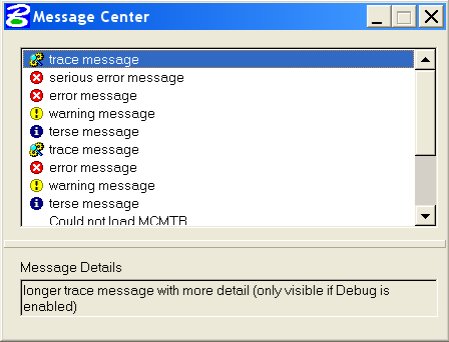
Optionally, you can tell ShowMessage to pop a modal dialog.
This obliges the user to acknowledge your message before proceeding …
Sub Main()
  '   Call using message type msdMessageCenterPriorityError to pop a dialog
  ShowMessage "serious error message", "longer error message with more detail pops a dialog", _
    msdMessageCenterPriorityError, True
End Sub

The Message Center has a Debug property that the user can set to show or hide
messages having the msdMessageCenterPriorityDebug priority. You can set this property by right-clicking
the Message Center and toggling the check-box …
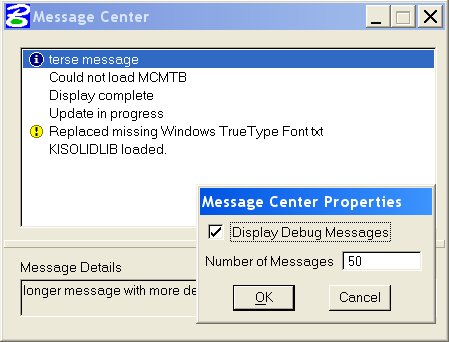
An invaluable feature of the Message Center is that a user can copy your message from the lower pane captioned Message Details.
When you're developing code, make use of this feature. Instruct the user to enable the Debug property,
described above, and insert ShowMessage calls into
your code with the msdMessageCenterPriorityDebug priority. When things go wrong, ask the user to copy the debug
messages and e-mail them to you for easier diagnosis.
If you're using an early version of MicroStation V8 that doesn't include ShowMessage,
here's code that provides similar functionality.
Message Center for C# Programmers
TBD: MicroStation CONNECT's DgnPlatformNet provides the NotificationManager class.
Message Center for C++ Programmers
MicroStation CONNECT's MicroStationAPI provides the NotificationManager class.
There are two output functions, replicated for multibyte and Unicode, that add your message to the message centre
The extended functions, mdlOutput_messageCenterEx and mdlOutput_messageCenterExW,
provide some additional features not available to VBA developers.
You need to #include the appropriate header file in your source code.
The functions are implemented in the built-in module, so you don't have any additional link requirements …
#include  <msoutput.fdf>

mdlOutput_messageCenter
mdlOutput_messageCenterW
mdlOutput_messageCenterEx
mdlOutput_messageCenterExW
The calling syntax is straightforward …
#include  <msoutput.fdf>

char     terse   [128];
char     verbose [128 + MAXQUOTEDFILELENGTH];

sprintf (terse,    "Short MDL message from %s", mdlSystem_getCurrTaskID ());
sprintf (verbose, "A longer MDL message from %s current DGN file '%s'", mdlSystem_getCurrTaskID (), tcb->dgnfilenm);

mdlOutput_messageCenter (MESSAGE_DEBUG, terse, verbose, FALSE);


